How Film Transitions Shape Time and Attention
Learn how film transitions shape time and attention. Compare irises, fades, dissolves, and cuts, then use a simple method to read what changes between scenes.
The most common mistake when watching a film transition is to treat it as a seam between scenes and move on. That costs you a clue about time, attention, or how two images connect. A film transition can announce a pause, overlap moments, or guide your eye without drawing attention to itself.
Film transitions have many histories, not one march toward quieter cuts
Film transitions have never followed a simple path from conspicuous effects to invisible editing. Irises, fades, dissolves, and direct cuts have all served different purposes, and filmmakers have used them in different periods and styles. A visible effect did not disappear when less noticeable cuts became common; it remained one option among many.
An iris opens or closes a circular area of the image. It can isolate a face or object, reveal a subject gradually, or give a scene a deliberately marked ending. A fade changes the image to or from black, making a pause visible. A dissolve briefly overlaps two images, linking them through time, association, or composition.
A cut replaces one shot with another at once. Continuity editing can make that change easy to follow by preserving movement or screen direction, while a jump cut exposes a gap and a match cut links images through a shared shape or action. These techniques are not stages in a single historical sequence. They are choices filmmakers can combine or use separately.
What matters for a close viewing is not whether a transition seems old-fashioned or modern. Watch what it makes visible and how the shots around it shape its meaning.
Visible effects make the boundary part of the scene
An iris or fade asks you to register a change. An iris may narrow attention to one part of the frame; a fade to black creates a distinct break. The effect does not dictate a single meaning. Look at what the film shows immediately before and after it.
A dissolve keeps both images present for a brief overlap. A room giving way to a landscape might suggest elapsed time, memory, or a visual association, but the surrounding scene must support that reading. The overlap alone cannot tell you whether the second image is a literal memory or a later event.
These devices can suit a moment when a film wants the boundary itself to carry emphasis. They may also establish a stylized tone or make a shift feel reflective. A conspicuous effect can distract, though, if the scene depends on urgent, continuous action.
Less noticeable cuts still direct your attention
A cut can seem effortless, but it still selects what you see and when. A cut from a speaker to a listener shifts attention from the words to their effect. A cut from a reaching hand to a cup already on the table carries the action across the boundary. If the film cuts away before a reaction, that missing view may matter.
Sound can soften a visual change. A line of dialogue, footstep, or musical phrase may begin before the picture changes or continue after it does. Listen for that bridge, then ask whether it prepares you for the next place, links two moments, or keeps your attention with the scene you have just left.
A jump cut makes a gap more noticeable by skipping within an action or making movement seem discontinuous. A match cut links two shots through a shared shape, movement, or composition. One draws attention to a skip; the other invites comparison. Both are cuts, but they guide your attention differently.
Compare what happens before and after a transition
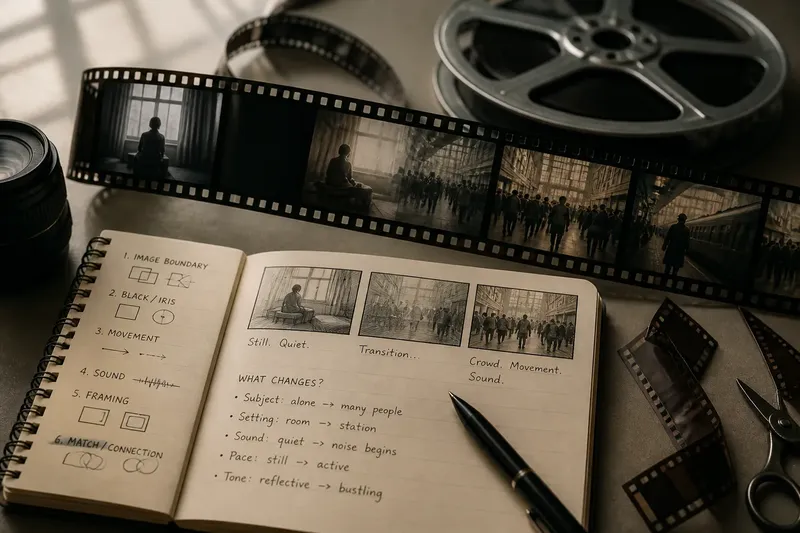
Use a short, repeatable method instead of trying to name every edit. Note the last image before the transition and the first image after it. Then check what stays constant and what changes: the subject, movement, sound, setting, pace, or emotional tone.
- Check the image boundary: If one image overlaps another, treat it as a dissolve and ask what the two images connect; if the image changes at once, look for a cut or another visible device instead.
- Check for black or a narrowing frame: If the picture fades to black or an iris closes, consider whether the scene marks a pause; if neither appears, look for a change carried by the cut or sound.
- Check movement across the edit: If a gesture continues in the next shot, follow the action; if it breaks or jumps, consider whether the gap is being emphasized.
- Check the sound: If dialogue, music, or a sound effect crosses the image change, listen for how it links the scenes; if the sound stops at the boundary, note the break instead.
- Check what the framing selects: If the next shot singles out a face or object, ask why that detail gets attention; if it opens onto a wider view, consider what new context it supplies.
- Check for a repeated shape or action: If a similar form or movement appears on both sides, compare the images; if there is no visible match, do not force one.
Say you are rewatching a scene where a person waits alone, followed by an arrival at a crowded station. The starting observations are simple: the person is still, the first scene is quiet, and the next scene contains moving commuters. First, check the boundary. If the film fades to black, the station arrives after a marked pause; if it dissolves, the waiting figure and commuters briefly share the frame; if it cuts directly, the arrival feels immediate. Next, listen for station noise before the image changes. If it begins early, sound leads your attention toward the new setting; if it starts only with the station image, sound and picture arrive together. The result is a grounded reading: the transition marks a pause, overlaps the moments, or makes the arrival direct, while the sound either anticipates or accompanies the change. It does not establish exactly how much time passed or prove what the person is thinking.
It is not worth cataloging every edit as if the technical name were the answer. If a transition does not change your sense of time, attention, or connection, note what you observed and move on.
Which transition details should you look for?
Does an iris always mean a scene is ending?
No. An iris can close a scene, but it can also isolate a face or reveal a detail. Check whether it ends the action or keeps your attention on something within it.
How can you tell a dissolve from a cut?
In a dissolve, the outgoing and incoming images overlap visibly. In a cut, one image gives way to the next at once, even if movement or sound makes the change feel smooth.
Can a cut suggest that time has passed?
Yes, if the shots show a changed place, activity, light, or arrangement. Those clues can suggest a later moment, but the cut alone may leave the length of the gap uncertain.
Do you need to name every transition?
No. Naming an iris, dissolve, or match cut can help describe what you see, but focus on the change in time, attention, or connection if the label adds nothing.
Use the surrounding scenes to test your reading
A transition offers a cue, not a fixed interpretation. A fade may mark a gap without revealing its length. A dissolve may connect two images without proving that one is a memory. A cut from one speaker to a listener can shift attention within the same conversation, without implying that time has passed.
On a first viewing, notice whether a boundary feels prominent or nearly disappears. On a rewatch, describe the change in plain terms: “the room empties,” “the sound arrives early,” or “the face becomes the focus.” If the choice seems significant, compare it with another transition in the same film. The useful question is whether the film handles similar changes in a similar way, or gives this moment a distinct emphasis.